
Runes offer various effects and set bonuses,
and equipping them will make your character stronger.
Runes are available after completing certain quests
and can be obtained through hunting, summoning, etc.
■ Contents
1. Rune Grades & Types
2. Equip rune
3. Set options
4. Fuse rune
5. Evolve rune
6. Rune Exchange
1. Rune Grades & Types
◈ Details
- Runes are categorized into 5 grades: Common, Uncommon, Rare, Epic, and Legendary.
- Runes are divided into 3 types: Urdr, Verdandi, and Skuld.
- Urdr: Goddess of the Past Urdr's rune grants a fixed effect after a certain number of uses.
- Verdandi: Goddess of the Present Verdandi's rune grants continuous effects based on the battle target.
- Skuld: Goddess of the Future Skuld's rune grants effects that trigger randomly.
2. Equip rune
◈ How to equip
- Tap the menu (☰) in the top-right and select 'Rune'.
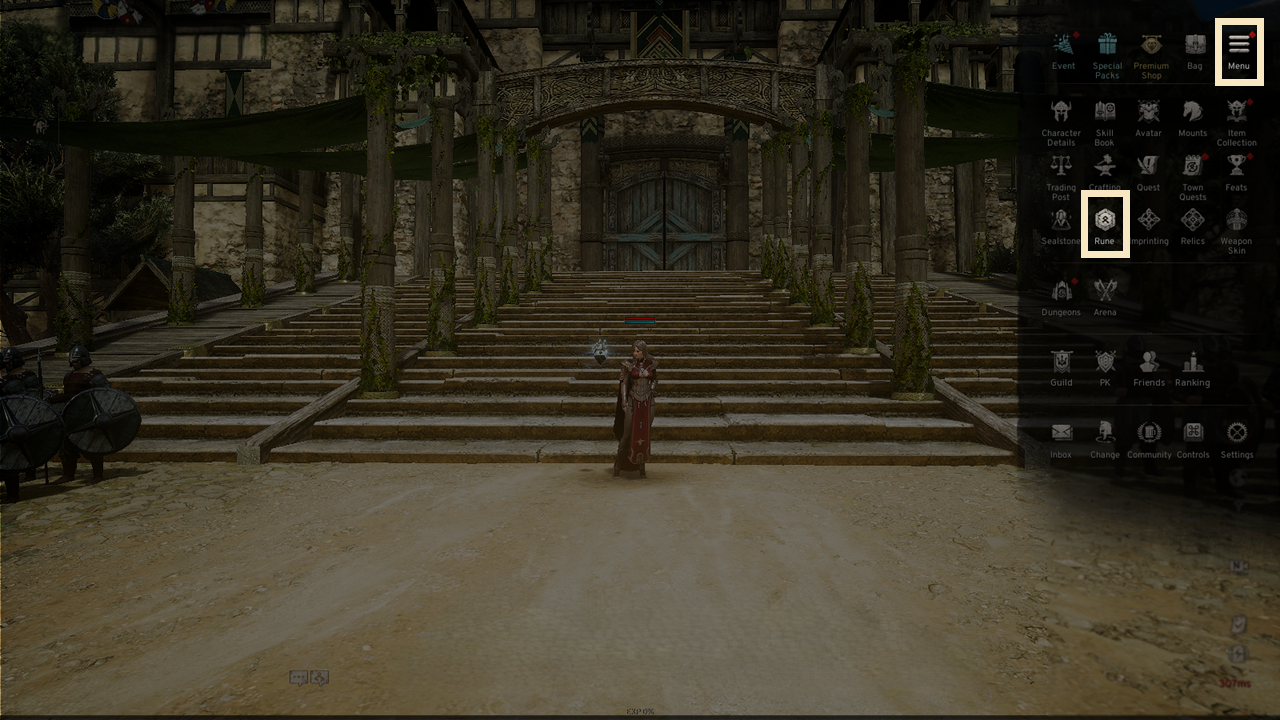
- A new rune slot will be unlocked once the level requirement is met.
-The rune system becomes accessible after completing the main quest '[Jotunheim Part.1] 20. Meal Time
- Runes can be equipped from the [Equip Rune] tab at the top.
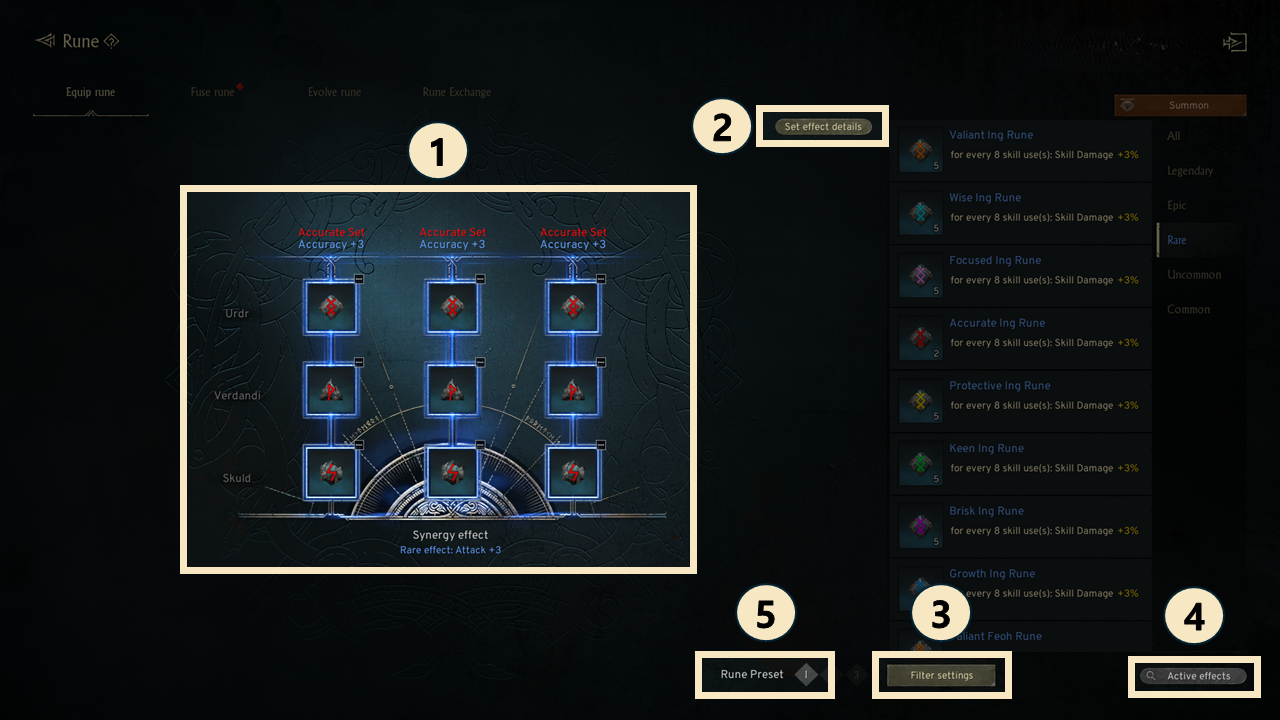
① Equip runes of the same shape to receive both individual and set effect bonuses.
- When all 9 slots are filled, the Synergy effect activates, with a maximum of 3 same-set effects.
② Set Effect details: See the set effects based on rune type and grade.
③ Filter settings: Filter to display only your chosen rune types.
④ View active effects: See the effects of the currently equipped runes.
⑤ Rune Preset: The Rune Preset system provides three slots, allowing you to equip different Runes in each preset and switch between them for situational use.
- When a Rune Preset is changed, the corresponding Rune effects are immediately applied to your Combat Power.
3. Set options
◈ Details
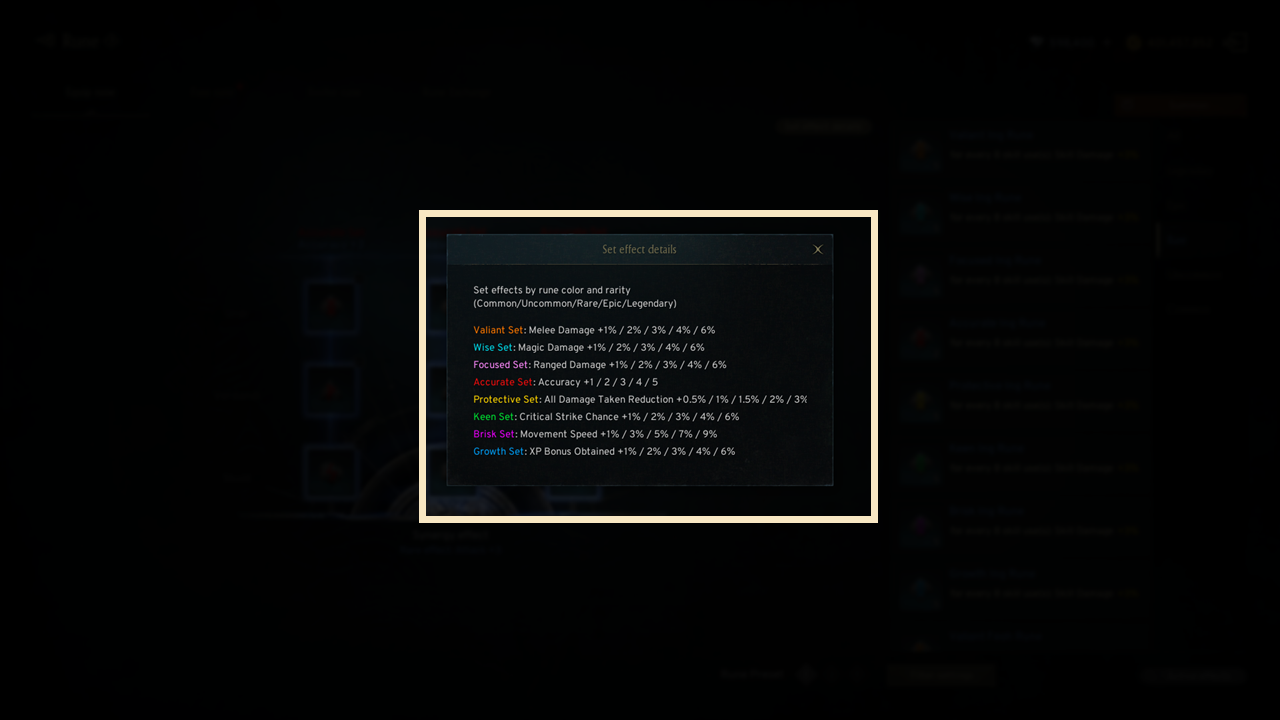
- The set options of Urdr, Verdandi, and Skuld are divided into 8 distinct categories.
- Different effects are applied to each set option, with higher rune grades resulting in stronger set option effects.
4. Fuse rune
◈ Details
- Fusing runes gives you a chance to acquire a rune of one grade higher.
! When fusing Legendary-grade runes, you may receive another Legendary-grade rune depending on the probability.
- Rune fragments can also be obtained, though at a lower chance, when fusing runes.
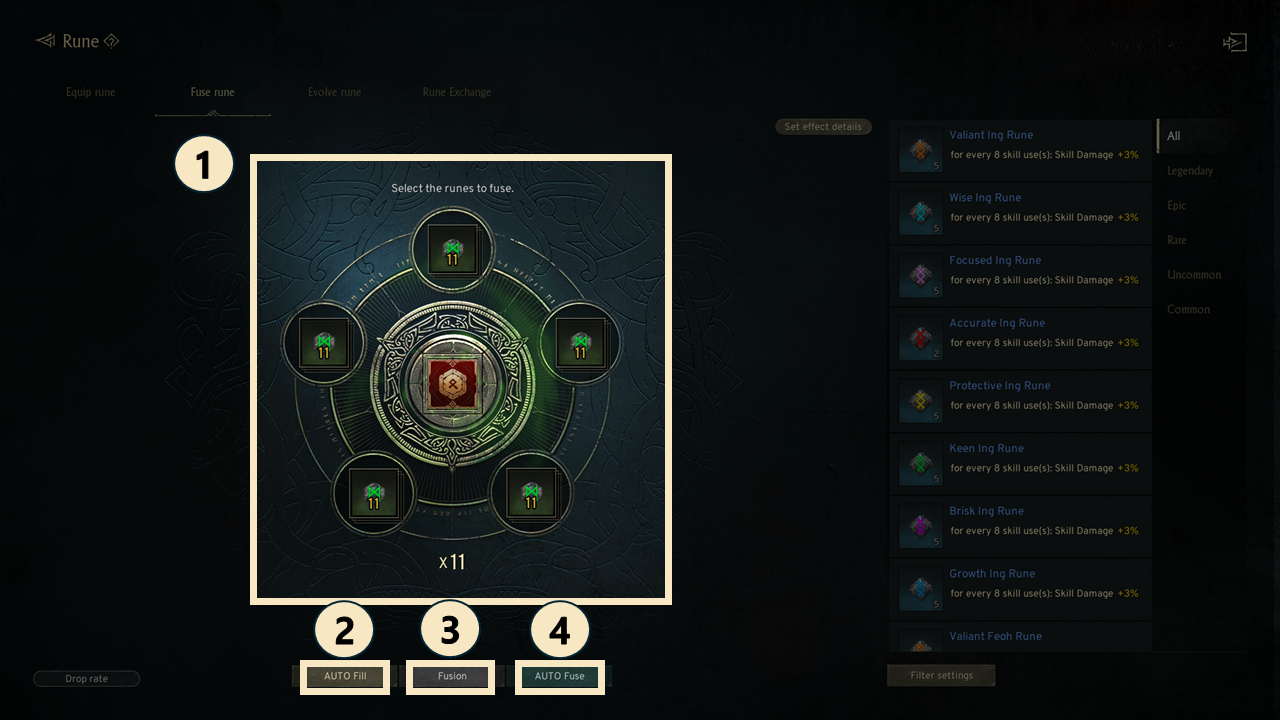
① Fusion materials: Register 5 runes of the same grade to fuse them into a higher-grade rune.
② AUTO Fill: Clicking this button will auto-select the fusion materials.
③ Fusion: After selecting the required materials, click 'Fuse' to complete the fusion process.
④ AUTO Fuse: Automatically fuses all runes from Common to Uncommon.
5. Evolve rune
◈ Details
- Evolve runes to obtain a new rune.
- To evolve a rune, you need 1 rune to evolve and 4 additional runes of the same grade and type.
! Legendary-grade runes cannot be evolved.
- Evolving a rune may change its options and set effects, with a small chance of increasing the rune's grade by one step.
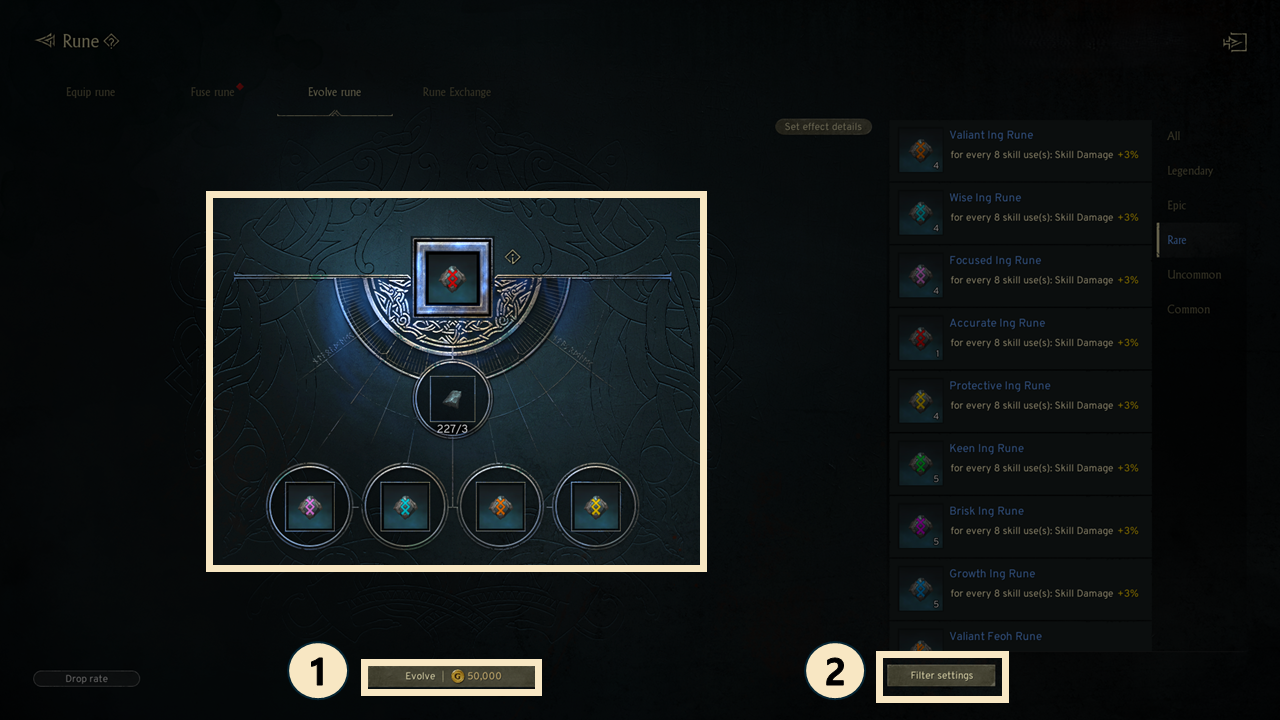
① Evolve : Evolving a rune will require certain materials and gold.
② Filter settings : Set filters to show only the runes that meet your specified conditions on the right.
6. Rune Exchange
- You can exchange Runes to other Runes using the Rune Exchange feature.
- To exchange runes, you need the following items: the Rune to exchange, Mana Imbued Rune Exchange Stone, and Gold.
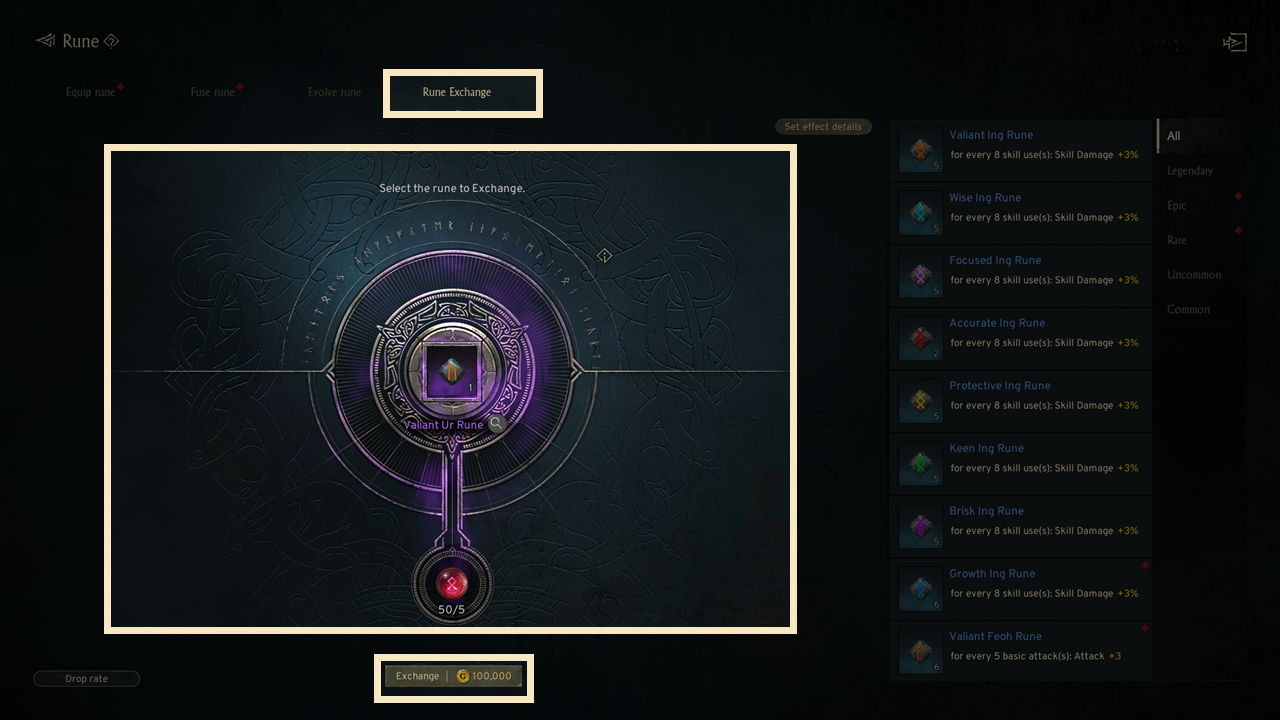
- Rune Exchange is available from Rare to Legendary Grades, and the set effect may change after the exchange.
- Mana Imbued Rune Exchange Stones can be crafted with Mana Imbued Rune Exchange Stone shards at the Crafting tab.
- Mana Imbued Rune Exchange Stone shards can be exchanged with Combat Tokens at the Trading Post.
! The Grade, Type, and Option of the Rune will not change.
If you need additional assistance, don't hesitate to contact our customer center through the button below.